Insights Websites
Ecommerce Website Accessibility: A UK Guide for Online Shops

An accessible ecommerce website is one that every customer can use to browse, choose and pay, whether they use a mouse, a keyboard, a screen reader, voice control or a phone held in one hand. The cheapest way to get there is to design and build for it from the start. The next best is to fix the checkout first, because that is where most online shops fail and where lost sales are easiest to count. We build small business shops by hand with accessibility and performance in mind, so this guide covers what to look for, what the law expects and what to fix in what order.
TL;DR
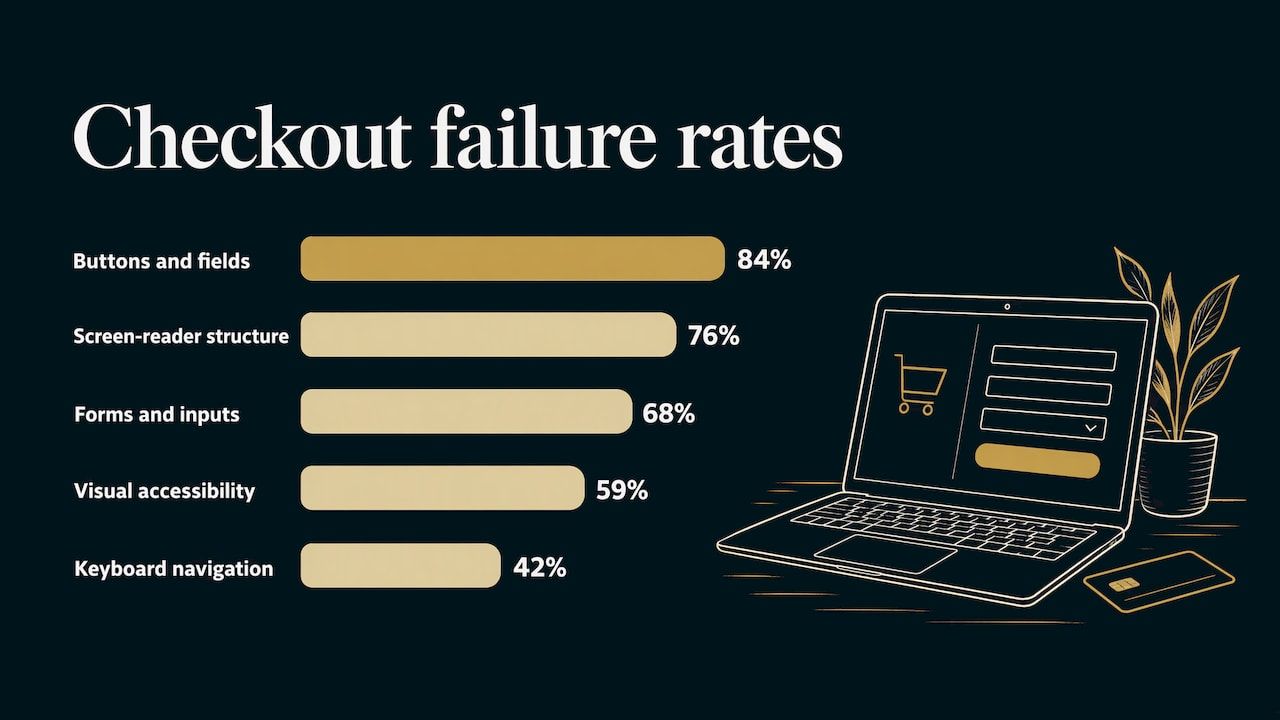
- Checkout is where shops fail most. In a 2025 audit of ecommerce sites, 84% of checkout pages failed on buttons and fields that screen readers could not identify.
- Inaccessible shops lose real money: a 2023 UK survey found 55% of adults had abandoned a purchase because of accessibility problems.
- No UK law names WCAG for private businesses, but the Equality Act 2010 requires reasonable adjustments, and WCAG 2.2 AA is the sensible target.
- Fix in order of impact: checkout and forms first, then contrast, labels and keyboard use, then product pages and content.
- Building accessibility in at design stage costs far less than retrofitting it later.
Table of Contents
- What ecommerce accessibility means in practice
- Where online shops fail most often
- What UK law expects from your shop
- The case for building accessibly from the start
- A practical order of fixes for an existing shop
- What accessibility work involves for a bespoke shop
- A shop designed to be used, not just looked at
- FAQ
- Sources
What ecommerce accessibility means in practice
Web accessibility means a site works for people with visual, hearing, motor or cognitive impairments. The shared yardstick is WCAG, the Web Content Accessibility Guidelines, a set of testable rules published by the W3C. They come in levels (A, AA, AAA), and AA is the level most businesses aim for.
For a shop, this is very concrete:
- A blind customer using a screen reader (software that reads the page aloud) needs to hear which product, size and colour they are choosing.
- A customer who cannot use a mouse needs to reach every button with the Tab key and see where they are on the page.
- A customer with low vision needs text that stands out from its background.
- A customer with dyslexia or a cognitive condition needs plain wording and forms that explain what went wrong.
None of this is a niche concern. DWP data put the UK’s disabled population at 16 million people, with combined spending power of £274bn. The same 2023 survey of 2,002 UK adults found 54% had faced accessibility issues shopping online. It estimated £120bn in potential lost online sales against a £224bn UK online retail market in 2022.
That is why accessibility belongs in a sales conversation, not only a compliance one. A shopper who cannot find the Place Order button does not complain. They leave.
Where online shops fail most often
The most useful evidence comes from audits of real checkouts. The Contentsquare Foundation’s 2025 readiness snapshot of European ecommerce sites, including UK ones, found these failure rates across checkout pages:
| Problem area | Share of checkout pages failing |
|---|---|
| Buttons and fields not announced to screen readers | 84% |
| Screen-reader compatibility and page structure | 76% |
| Forms and input usability (missing labels, poor error handling) | 68% |
| Visual accessibility (66% had text or buttons below the minimum 4.5:1 contrast) | 59% |
| Keyboard navigation and focus | 42% |
Source: Contentsquare Foundation, Ecommerce accessibility: 2025 readiness snapshot.
The same study points to what keeps going wrong in forms: fields without clear labels, fields that do not state their purpose (so browsers cannot autofill them), and error messages that do not say what is wrong or how to fix it.
A 2026 study reported by Ecommerce News found 87% of disabled consumers could not complete a typical retail journey independently. It also found 81% struggled to complete transactions, often because of inaccessible CAPTCHAs or complex verification, and 38% abandoned purchases at checkout.
The usual suspects, in plain English
- Images without alt text. Alt text is a short written description of an image. Without it, a screen reader user cannot tell one product variant from another.
- Low contrast. Pale grey text on white looks elegant and is unreadable for many people, as is a button that barely differs from its background.
- Unlabelled form fields. Placeholder text that vanishes when you type is not a label.
- Empty links and buttons. An icon-only basket or search button with no accessible name is announced as just “button”.
- Keyboard traps and lost focus. A pop-up, address-lookup list or date picker that a keyboard user cannot enter, leave or select from.
- Hard authentication. Puzzle CAPTCHAs, or password fields that block pasting from a password manager.
What UK law expects from your shop
The Equality Act 2010
If you sell to the public, you are a service provider. Section 20 of the Equality Act 2010 requires you to take reasonable steps so that disabled people are not put at a substantial disadvantage. That includes providing information in an accessible format.
Two features matter to a shop owner. The duty is anticipatory, meaning you plan for adjustments disabled people generally need rather than waiting for a complaint. It is also continuing, so past compliance does not excuse a later regression. A redesign, a new plugin or a seasonal campaign page can all break something that used to work.
The Act does not name WCAG for private businesses. In practice WCAG 2.2 AA is the benchmark most sensible sites work to, because it gives you a clear, testable way to show you have taken reasonable steps. Disability discrimination questions are a matter for a solicitor or the Equality Advisory and Support Service, so take specific legal worries there.
Selling to the EU
If you ship to EU consumers, the European Accessibility Act applies to ecommerce services. It became enforceable on 28 June 2025, including for UK businesses selling into the EU. Microenterprises, with fewer than 10 people and turnover or balance sheet of no more than €2 million, are exempt. If you are close to those limits, confirm your position before you rely on the exemption.
Public sector sites
Public sector websites have their own rules. Since 23 September 2018 they must meet an accessibility standard and publish an accessibility statement, per GOV.UK. Private shops are not bound by that regulation, but the GOV.UK method of checking a sample of pages, planning fixes and keeping new features accessible is a sound model to borrow.
The case for building accessibly from the start
Retrofitting accessibility onto a finished theme is slow, because the problems sit in the structure: how headings are nested, how the basket is coded, how the checkout form is assembled. Patching them one at a time, then losing the fixes at the next update, is the common pattern.
A hand-built shop avoids most of this. When the designer controls the markup, the contrast values, the form labels and the focus order, accessibility is a design decision made once, not a repair job done repeatedly. That is the reasoning behind how we work: every project is designed, written and built for the business, without generic templates or outsourced work, and you deal directly with the designer from start to finish.
The commercial logic is simple too. The same changes that help a screen reader user also help everyone on a phone in bright sunlight, in a hurry, with one thumb. Clear labels, large tap targets, readable contrast and fast pages reduce friction for all your customers.
A practical order of fixes for an existing shop
GOV.UK’s guidance is to check for problems, plan fixes “within reason”, prioritise by user impact and build accessibility into long-term planning. Applied to a small shop, that gives this order.
1. Check a sample of the pages that make money
You do not need to test every page. Pick a representative sample: the home page, a category page, a product page with variants, the basket, each checkout step, the order confirmation, the contact or enquiry form and, if you take bookings, the booking journey. Test them against WCAG 2.2 AA.
Three quick checks you can do yourself in ten minutes:
- Put the mouse aside and complete a purchase with Tab, Shift+Tab, Enter and Space. Can you see where you are at each step? Can you reach everything?
- Zoom the browser to 200%. Does anything overlap or disappear?
- Submit the checkout form with errors. Does each message say which field and what to do?
These show you the symptoms. An accurate audit of the code and a screen reader run-through is what tells you the causes. Our free website review is a starting point if you want an experienced eye on your site.
2. Fix checkout and forms first
Checkout failures end the sale outright, so they come first. Look for:
- Every field has a visible, permanent label and a clear purpose, so browsers and password managers can autofill it.
- Error messages name the field, say what is wrong and suggest the fix.
- Buttons and custom controls (card expiry pickers, address lookups, quantity steppers) can be operated by keyboard and announced properly. One blind shopper described address suggestion lists covering the form and expiry pickers a screen reader could not operate, and abandoning an order after failing to find the Place Order button.
- You do not make customers re-type information they have already given, such as billing details that match delivery.
- Login and verification steps do not depend on solving a puzzle or block pasting.
3. Clear the common, quick failures
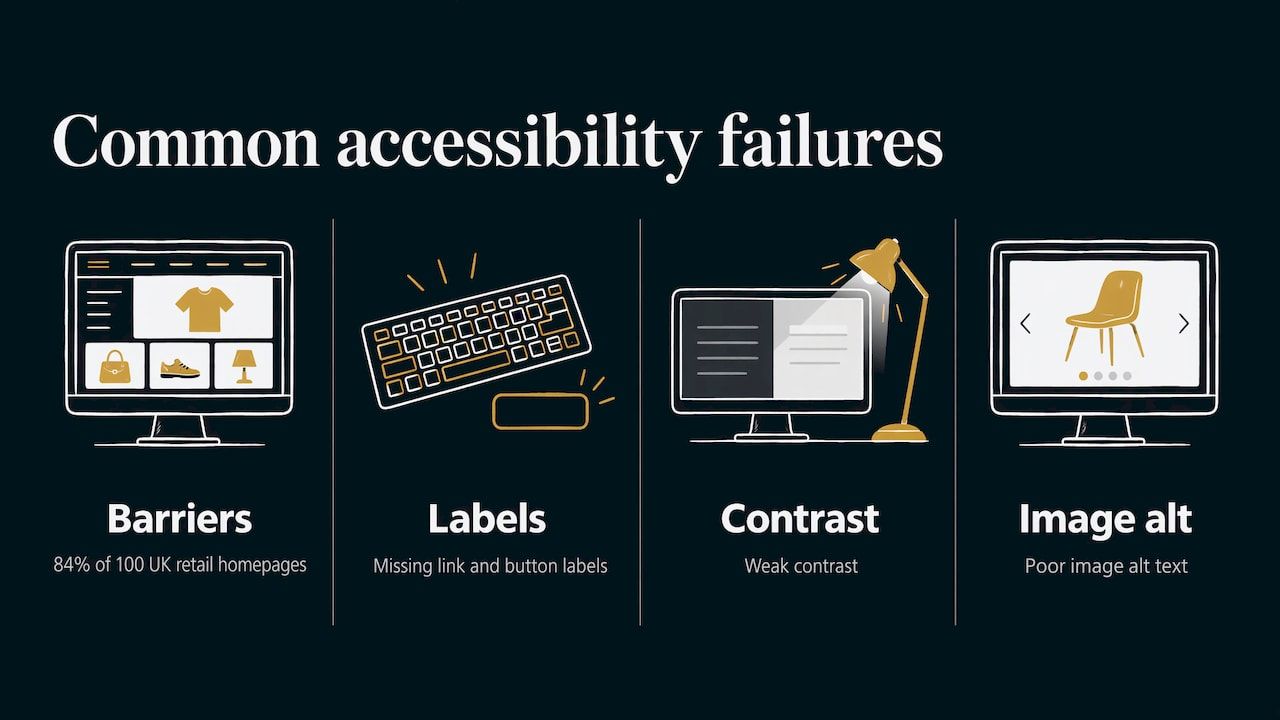
Next, work through the faults that appear on most sites: low contrast, missing alt text, unlabelled fields, empty links, empty buttons and a missing page language. An analysis of the 100 most popular UK retail brands found 84% of homepages had issues creating critical barriers, most commonly missing link and button labels, weak contrast and poor image alt text. These are fixable in a build or a redesign, and they are the first things an audit tool flags.
4. Fix what only a human can find
Automated scanners catch only part of the problem. Keyboard traps, a confusing focus order, and basket updates that happen silently (so a screen reader user never hears “item added”) need a person to test them. Do this on the real journey, not on isolated components.
5. Write your product content for people
Product pages benefit from descriptive alt text for each variant image, headings that follow a logical order, size guides in real tables rather than images, plain-English descriptions and captions for any video. Treat this as part of how you write, not a one-off clean-up.
6. Publish a short accessibility statement and keep checking
Public bodies must publish one, and it is good practice for a shop too. GOV.UK says a statement should say whether the site is fully, partially or not compliant, what fails and why, how to get an alternative, and how to report problems, in plain English. Then retest whenever you change the theme, add an app or launch a campaign, because the duty is continuing.
What accessibility work involves for a bespoke shop
On a new build, accessibility is part of the design and development brief: colour palettes chosen for contrast, forms labelled properly, a visible focus style, a sensible heading structure, and checkout and booking journeys that work from the keyboard. We list performance and accessibility among our services, and for shops our ecommerce web design starts from £995.
If you already have a shop that sells but frustrates people, a rebuild can fix the structure without throwing away your hard-won search rankings. Our guide to an ecommerce website redesign without losing sales or rankings explains how, and the website redesign checklist covers what to do before, during and after launch. We have also written about whether your website passes the 2026 accessibility test and what failing it can cost.
Because accessibility can slip after launch, ongoing care matters. Our Website Care plan is £25 per month, Managed Website Care is £50 per month, and ad-hoc website support is £50 per hour, all on the Website Care page.
A shop designed to be used, not just looked at
If your online shop needs to work for every customer from the first click to the order confirmation, we design and build it by hand around your brand, with accessibility and performance part of the build. You work directly with the designer from consultation to launch. Starter websites begin at £295, Growth is £595 and Bespoke starts from £995, all listed on our services page.
To see how we approach online shops, look at the Digital Beacon ecommerce case study, or talk to us about your own shop through the ecommerce web design page.
FAQ
Is ecommerce website accessibility a legal requirement in the UK?
No UK statute names WCAG for private businesses. However, section 20 of the Equality Act 2010 requires service providers to make reasonable adjustments for disabled people, and that duty covers websites. Working to WCAG 2.2 AA is the usual way to show you have taken reasonable steps. For advice on a specific situation, speak to a solicitor.
Does the European Accessibility Act apply to my UK shop?
It can, if you sell to consumers in the EU. It has been enforceable since 28 June 2025. Microenterprises with fewer than 10 staff and turnover or balance sheet of no more than €2 million are exempt, so check where you stand against those figures.
Which part of an online shop should I make accessible first?
Start with checkout and forms. Audits show these are the most consistently failing parts of ecommerce sites, and a failure there stops the sale completely. Then fix contrast, labels, empty links and buttons, then keyboard behaviour and product content.
How do I check whether my shop is accessible?
Test a representative sample of your key pages against WCAG 2.2 AA, including the full purchase journey by keyboard only. Automated tools find some faults, but a person needs to check focus order, keyboard traps and screen reader behaviour. We offer a free website review if you want a second pair of eyes.
Do accessibility improvements help sales?
They remove barriers that make shoppers abandon purchases. In a 2023 UK survey, 55% of adults had discarded a purchase because of accessibility problems. The same improvements, such as clear forms and readable text, also help every customer on a phone.
Sources
- Ecommerce accessibility: 2025 readiness snapshot, Contentsquare Foundation
- £120 billion in online sales at stake: UK retailers ignoring accessibility, Retail Technology Review
- Disabled shoppers face widespread barriers, study finds, Ecommerce News
- Equality Act 2010, section 20, legislation.gov.uk
- The UK Equality Act and PSBAR: Digital Obligations, Disability World
- Make your website or app accessible and publish an accessibility statement, GOV.UK
- Ecommerce Web Accessibility Experiences, 2023
- Retail Accessibility in E-commerce: Challenges and Opportunities 2026