Insights Websites
Online Payment Integration: How to Add Payments to Your Website
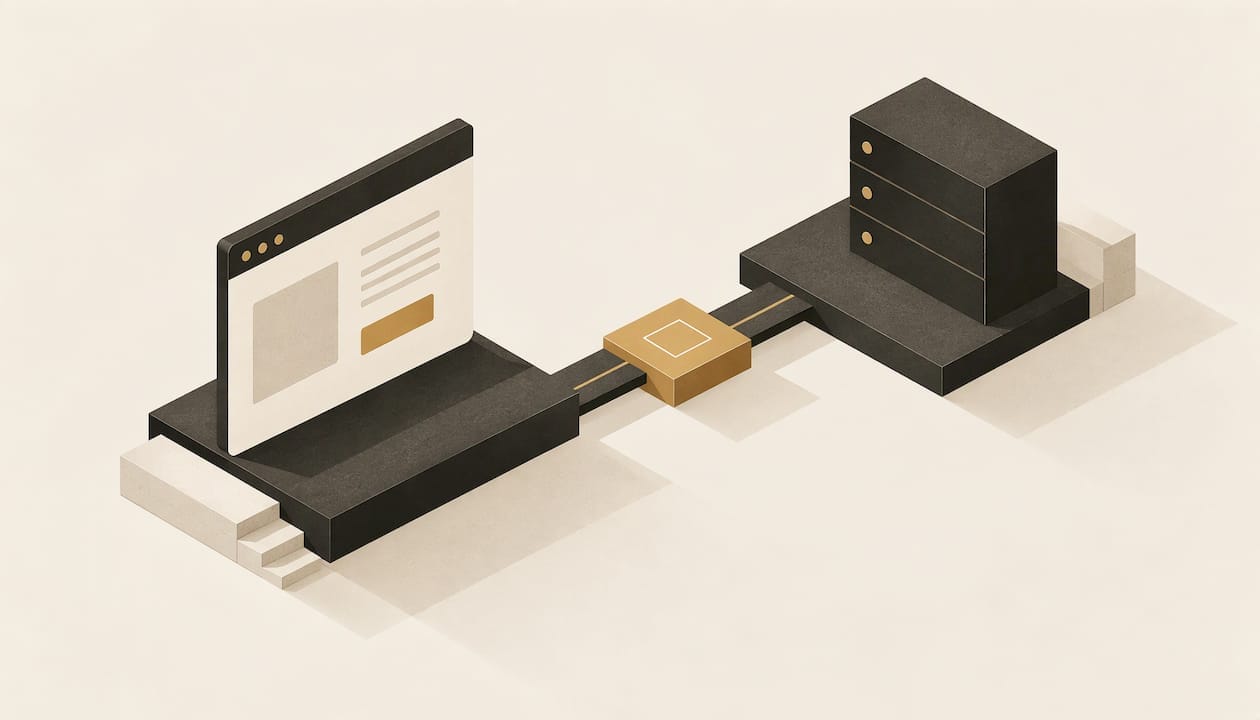
Online payment integration is the connection between your website’s checkout and a payment gateway, the service that passes card details to the banks and tells your site whether the payment went through. For most UK small businesses the right answer is a hosted or embedded checkout from a flat-rate gateway, built into a site designed around how your customers actually buy. The gateway is the easy part. Getting the checkout, the confirmation emails, the bookings and the testing right is where a bespoke build earns its fee, and it is what we do at SR7 Web Design.
TL;DR
- Payment integration links your checkout to a gateway and a merchant account, so a card payment is approved, declined and paid out to your bank account.
- Most small businesses should start with a hosted checkout: it keeps card data off your site and keeps the security paperwork to its simplest level.
- Expect no setup fee with a flat-rate gateway, then roughly 1.5% + 20p per standard UK card payment (2026 figures).
- Test a real payment and a refund through every method before launch, and make sure your site reacts to the gateway’s confirmation, not just the thank-you page.
- Checkout design decides how many customers finish paying: no forced accounts, no surprise costs, Apple Pay and Google Pay switched on.
Table of Contents
- What online payment integration actually means
- The three ways to connect payments to your site
- Which approach suits your type of business
- What online payment integration costs
- Security and legal basics for UK payments
- Which payment methods to offer
- The integration process, step by step
- Making checkout convert: fewer failed and abandoned payments
- Getting payments built into a site made for your business
- FAQ
- Sources
What online payment integration actually means
When a customer pays on your site, several parties are involved, and integration is the work of connecting them to your pages.
The customer enters card details or picks a wallet. The details are encrypted and sent to the payment gateway, which passes them to the payment processor. The processor checks with the customer’s bank, and an approved or declined answer travels back through the chain to your site. Stripe’s integration guide sets out this sequence, ending with the funds being settled to your business’s bank account.
Two pieces of jargon are worth knowing:
- Payment gateway: the online equivalent of a card machine. It captures the payment securely.
- Merchant account: the account that receives the money from card payments before it reaches your bank. Setting up online payments needs both a gateway and a merchant account, as Clover UK’s setup guide explains. Many modern providers bundle the two into one product, so you may only sign up once.
The security community describes a typical third-party flow in five steps: your site prepares the cart, asks the gateway to start an order, sends the customer to the gateway’s payment page (or shows its form), the payment is made, and the customer returns while your server verifies the result. The OWASP cheat sheet on third-party payment gateways lays out that flow for developers.
You do not need to build any of this yourself. You do need to understand the choices, because they affect cost, security and how your checkout looks.
The three ways to connect payments to your site
There are three broad approaches. Which one fits depends on what you sell and how much control you want over the checkout.
Hosted checkout
Your customer is sent to a payment page run by the gateway, or sees the gateway’s form inside your page. The gateway hosts the card form, so you only add the code that starts the payment. Barclaycard’s hosted checkout integration guide notes that hosted pages reduce both the security compliance burden and the integration effort, while still allowing some branding.
This is the best starting point for most small businesses: quick to launch, lower risk, and good enough for shops, bookings and deposits.
Embedded or API integration
The payment form sits directly on your own checkout and talks to the gateway through its API (the technical doorway a gateway offers developers). Worldpay’s guide describes this as faster for the customer, but it leaves you responsible for more of the transaction security. A well-built embedded form uses the gateway’s own secure fields so card numbers never touch your server.
This suits brands where the checkout is part of the experience and the product range, delivery options or booking rules need custom logic.
Payment links and invoices
You create a link in your gateway dashboard and send it by email or message, or add it as a button. There is no checkout to build. Business.com’s overview lists payment links and online invoicing alongside integrated checkouts as ways to take money without a full shop. It works for a handful of services or one-off deposits, but it does not scale to a catalogue.
| Approach | Best for | Setup effort | Branding control |
|---|---|---|---|
| Hosted checkout | Most small shops, deposits, bookings | Hours to days | Some |
| Embedded or API | Custom shops, memberships, complex bookings | Days to weeks | Full |
| Payment links | A few services, invoices | Minutes | Minimal |
Which approach suits your type of business
The right choice follows from what your customers do on your site.
Retail and ecommerce. A shop needs a basket, shipping rules, tax and stock to talk to the payment step. Hosted checkout is the quickest route. An embedded checkout is worth it when the cart and checkout are part of how you stand out from other shops. Our ecommerce web design work starts at £995, and the build is designed around your products rather than a stock layout.
Service providers. Salons, trades, gyms and consultants usually need deposits or full payment at the moment of booking. That means the payment step and the booking calendar must work as one flow, so a customer cannot pay for a slot that has already gone.
Restaurants and takeaways. Online ordering depends on payment, order notification and the kitchen’s workflow staying in step. We cover this in our guide to takeaway websites with online ordering.
Memberships and subscriptions. Recurring payments need a gateway that supports them and a site that handles failed renewals politely.
What online payment integration costs
There are two kinds of cost: building the integration into your website, and paying the provider per transaction.
Provider fees
Fees are published by the providers and change, so treat these as the 2026 position and check the live pricing page before you commit. According to Business Expert’s comparison, updated in November 2026 with vendor pricing checked in October 2026:
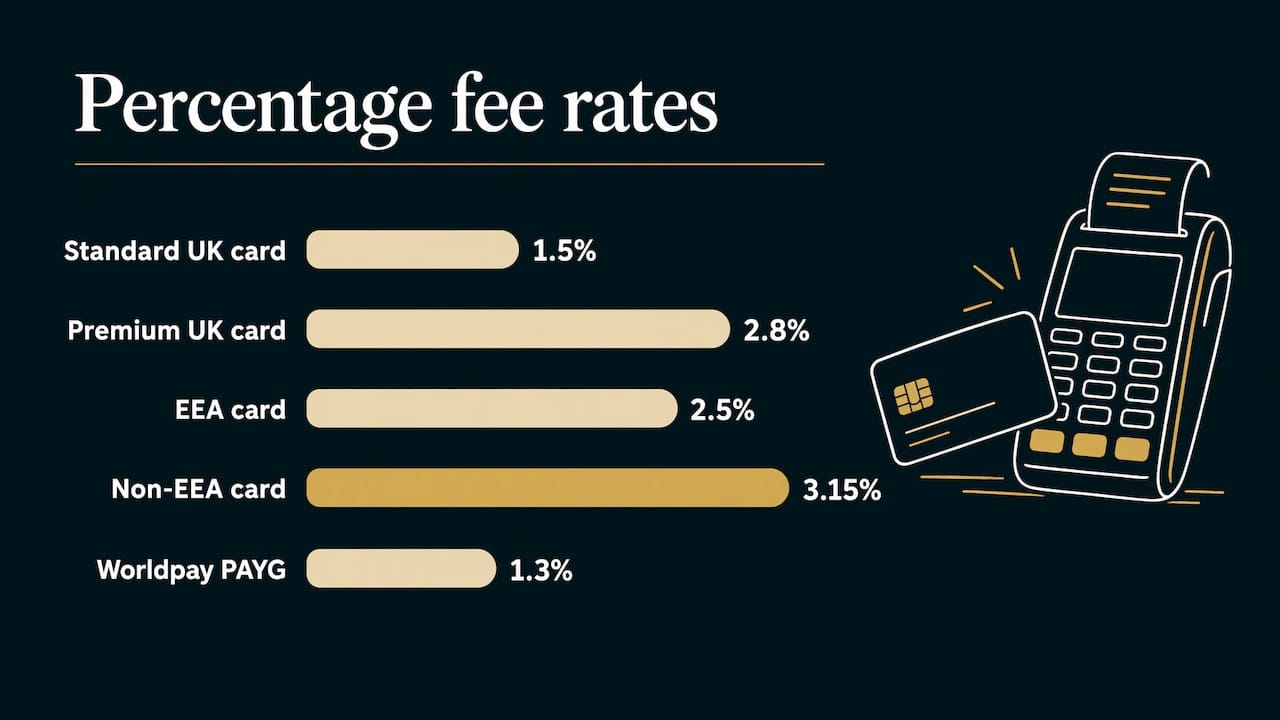
- A flat-rate gateway such as Stripe charges 1.5% + 20p on standard UK consumer cards online, with no setup, monthly or PCI fee.
- Premium UK cards cost 2.8% + 20p, EEA cards 2.5% + 20p and non-EEA cards 3.15% + 20p, with 2% extra for currency conversion.
- A traditional acquirer such as Worldpay lists pay-as-you-go at 1.3% + 20p with a live online shop, but custom quotes add a £15 minimum monthly service charge and a £5 monthly PCI fee, which is £240 a year before a single sale, with an 18-month standard initial term.
A broader UK gateway comparison from April 2026 puts typical gateway fees at 1.2% to 2.9% plus 20p to 30p per transaction, with monthly fees from £0 to £25.
Here is a worked example. A customer pays £60 for an order on a standard UK card at 1.5% + 20p. The fee is 90p plus 20p, so £1.10, and you keep £58.90. At 200 orders of that size a month, fees come to £220. Run the same sum with your own average order value before you choose, because the fixed 20p weighs heavily on small baskets.
For a business starting out, an all-in-one provider is the simplest option: one signup, no separate merchant account. Separate gateway and merchant account arrangements can be cheaper at high volume but mean two relationships and a harder setup, as the same UK comparison notes.
Build costs
Payment integration is part of the website build rather than a separate product. Our published prices are £295 for Starter, £595 for Growth and from £995 for Bespoke, and from £995 for ecommerce web design. Booking, payments and members functionality is one of our listed services and is scoped to the project. You can see what each tier includes on our services and pricing page, and our guide to what a small business website should cost in the North East puts the numbers in context.
Security and legal basics for UK payments
Three requirements matter to a small business.
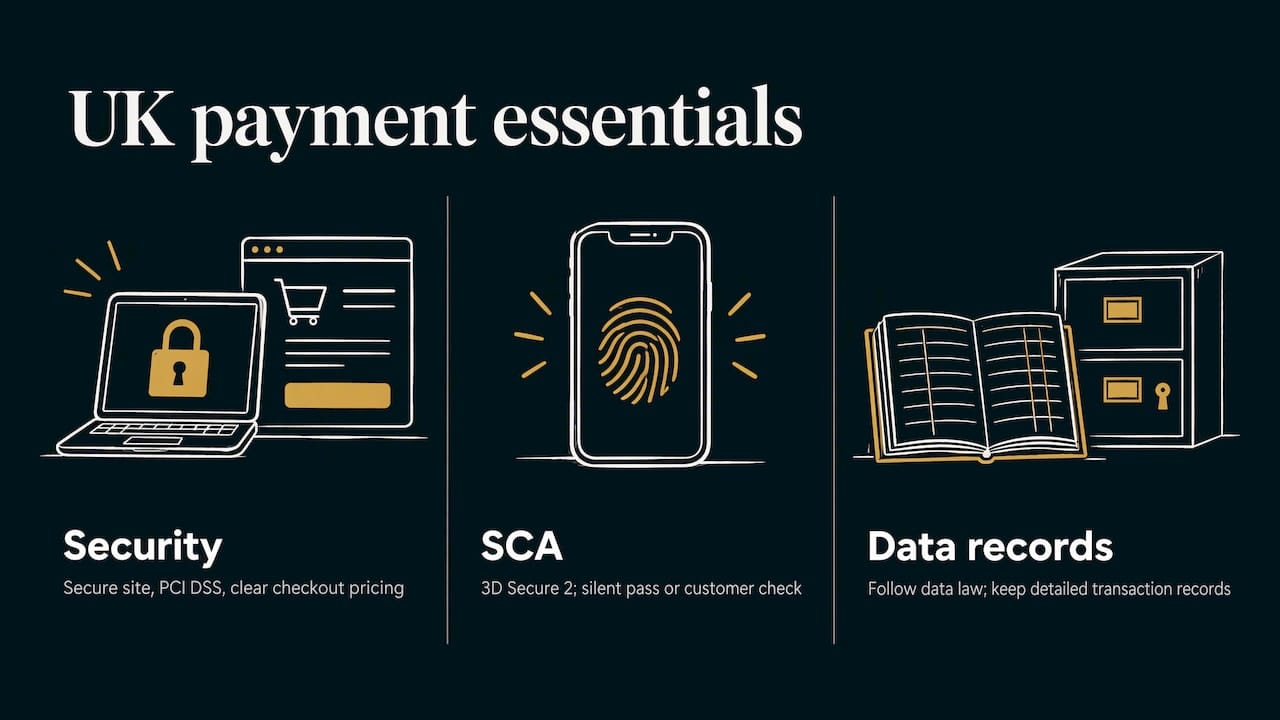
A secure site and PCI DSS. The Federation of Small Businesses says taking payments online needs a business bank account, a secure website with an SSL certificate, a payment gateway and PCI DSS compliance, plus clear pricing with VAT and shipping shown before checkout. In its guidance for online stores it adds that modern gateways handle the technical side of PCI DSS, though you remain responsible for secure systems and staff handling of customer information. PCI DSS is the card industry’s security standard.
The type of integration sets how heavy that burden is. Business Expert’s UK guide explains that a hosted checkout keeps a business in the simplest self-assessment tier (SAQ A) and deploys in hours, a self-hosted form posting to the gateway is SAQ A-EP, and a full API build is SAQ D unless card data is tokenised.
Strong Customer Authentication. Under the UK and EU payment rules, many online card payments need a second check. This runs through 3D Secure 2, which either passes a payment silently or asks the customer to confirm with a biometric or banking app. The same guide notes that a passed challenge shifts fraud liability from you to the card issuer, and that exemptions include low-value payments (under about £25), transaction risk analysis and merchant-initiated recurring payments. Make sure your gateway has 3D Secure 2 and exemptions switched on.
Data protection and anti-money-laundering. Stripe’s UK payments guide, published in June 2026, notes that UK businesses must follow data protection law and keep detailed transaction records. If you hold customer details beyond the payment itself, your privacy notice and storage practice matter. Your accountant is the right person for questions on records and tax.
Which payment methods to offer
Cards are the baseline. Beyond that, the guidance for UK stores is consistent: switch on Apple Pay and Google Pay at no extra cost for faster mobile checkout, keep PayPal for customers who trust it, and consider open banking or buy now pay later only where basket sizes justify it. Stripe’s payment methods guide lists cards, wallets, bank transfers, buy now pay later and others, so you can see the full range.
A sensible starting set for a small UK business:
- Debit and credit cards.
- Apple Pay and Google Pay.
- PayPal, if your customers ask for it.
- Direct debit, only if you take recurring payments such as memberships.
Every extra method adds a button, a test and a fee to understand. Add them when customers ask, not because the list looks impressive.
The integration process, step by step
Here is the sequence from decision to live payments, and where each step tends to go wrong.
1. Choose the integration type
Decide between hosted, embedded or links using the table above. The mistake here is choosing a heavy API build for a shop that would be perfectly served by a hosted checkout. A full API build can mean months of engineering, according to Business Expert’s UK guide. We scope the approach with you at the consultation, before any design work starts, so you are not paying for complexity you do not need.
2. Open your gateway and merchant account
You will pass identity checks with your sole-trader or company details, bank account and ID. Allow time: approval is not instant, so start this early, in parallel with the design. The delay people hit is applying only when the site is finished.
3. Design the checkout around the payment step
This is where a bespoke build matters. The payment step should look like your brand, work on a phone, show the total cost clearly and give the customer a clear receipt. We design and build the whole site by hand, with direct access to the designer from start to finish, so the checkout is not an afterthought bolted on at the end.
4. Connect the gateway and the order flow
The site must create the order, send the customer to pay, and then mark the order as paid. The detail that catches people out is that a customer arriving on your thank-you page does not prove the money has settled. PayBito’s integration guide stresses that a sound integration listens for server-to-server notifications from the gateway (webhooks), because customers close browsers and lose signal mid-checkout. Without that, you get paid orders that your site never recorded, or the reverse.
5. Configure security and notifications
Turn on 3D Secure 2, confirm the exemptions you want, and set email notifications for successful payments and refunds, as Clover UK’s guide recommends.
6. Test before you go live
Run test transactions in the gateway’s sandbox, then run a live low-value payment and a refund through every method you offer. Check these:
- A successful payment marks the order as paid and sends the right emails.
- A declined card shows a clear message and keeps the basket.
- A customer who closes the tab after paying still gets their order recorded.
- The payout reaches your bank when the gateway says it will.
- The checkout is quick and readable on a phone.
Business Expert’s UK guide recommends exactly this live transaction and refund test through each method, and Clover UK adds checking for errors, security vulnerabilities and speed issues.
7. Launch and watch the first weeks
Check the gateway dashboard against your own order list for the first few days. Small mismatches show up early and are far easier to fix then.
Making checkout convert: fewer failed and abandoned payments
Payment integration is not finished when the money moves. A checkout that works but puts people off still loses sales.
The Baymard Institute, which researches checkout usability, reports that 18% of users abandon a checkout if forced to create an account. A guest option is one of the cheapest improvements you can make.
Other fixes that follow from the guidance above:
- Show the full cost early. The FSB advises showing VAT and shipping before checkout, so the total never comes as a surprise.
- Offer wallets. Apple Pay and Google Pay skip the card form entirely on mobile.
- Keep the basket on failure. If a payment is declined, the customer should land back on a pre-filled page with a clear message.
- Speed. A slow payment page feels risky. Performance is part of how we build every site.
- Make the brand consistent. A checkout that suddenly looks like a different company makes people hesitate. Hosted pages that allow branding help here.
If you already have a shop and the checkout is the weak point, a rebuild may be worth more than another marketing spend. Our guide to ecommerce website redesign without losing sales or rankings covers how to do it safely, and our Digital Beacon case study shows an ecommerce build.
Getting payments built into a site made for your business
A gateway account gives you the ability to take money. A website built around your customers makes them willing to pay. At SR7 Web Design we hand-build every site, write the copy and design to suit your business, and the work runs from consultation to launch with direct access to the designer, not through an outsourced team. Payments, bookings and member areas are part of what we build, and ecommerce projects start from £995.

If you want a shop or a booking site that takes payment properly from day one, look at our ecommerce web design or see the options and prices on our services page. After launch, our Website Care plans start at £25 a month and cover ongoing site support, so the site stays up to date as your needs change.
FAQ
How long does it take to add online payments to a website?
A hosted checkout can be deployed in hours once your account is approved, according to Business Expert’s UK guide. The slower part is usually account approval and identity checks, so apply early. A custom shop with bookings or memberships takes longer because the checkout has to be designed and tested.
Do I need a separate merchant account?
Not necessarily. Many all-in-one providers bundle the gateway and merchant account into a single signup, which is the simplest route for most UK small businesses. Separate arrangements can cost less at high volumes but mean managing two relationships.
Is a hosted checkout or an embedded checkout better?
A hosted checkout is the quickest and keeps card data off your site, so it suits most small businesses. An embedded checkout gives you full control of the look and flow, which suits custom shops. We recommend the approach at the start of each project, based on what you sell.
What should I test before taking real payments?
Test a successful payment, a declined card and a refund through every method, then check that orders are recorded even if the customer closes the page after paying. Confirm the confirmation emails and the payout date too.
What does online payment integration cost?
With a flat-rate gateway there is typically no setup or monthly fee, and card payments cost around 1.5% + 20p on standard UK cards (2026 figures). The build is part of your website project: our ecommerce web design starts from £995.
Sources
- How to integrate a payment gateway into a website, Stripe
- How to set up online payments, Clover UK
- Third Party Payment Gateway Integration Cheat Sheet, OWASP
- Secure Acceptance Hosted Checkout Integration, Barclaycard
- How to integrate a payment gateway into a website, Worldpay
- How to accept online payments, Business.com
- Worldpay vs Stripe payment processing, Business Expert
- Best payment gateway UK 2026, Kael Tripton
- FSB guide to taking payments for your online store
- How to accept online payments in the UK (2026), Business Expert
- How to accept payments in the United Kingdom, Stripe
- How to choose the right ecommerce payment methods, Stripe
- Payment gateway integration guide, PayBito
- How to reduce cart abandonment, Baymard Institute